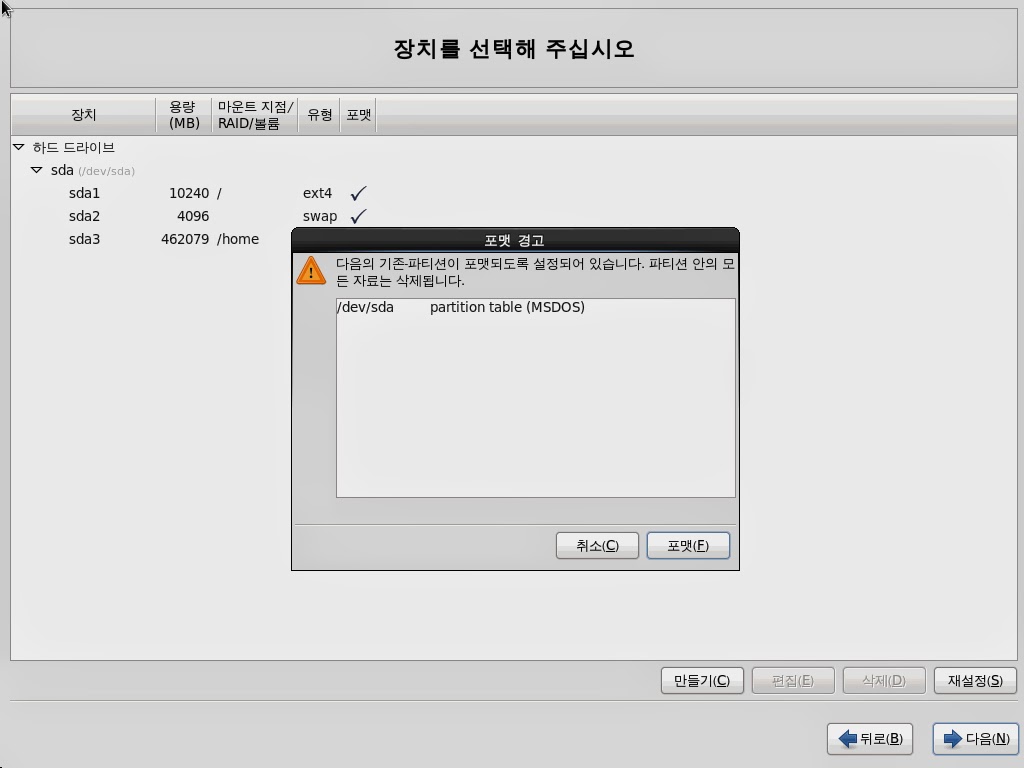
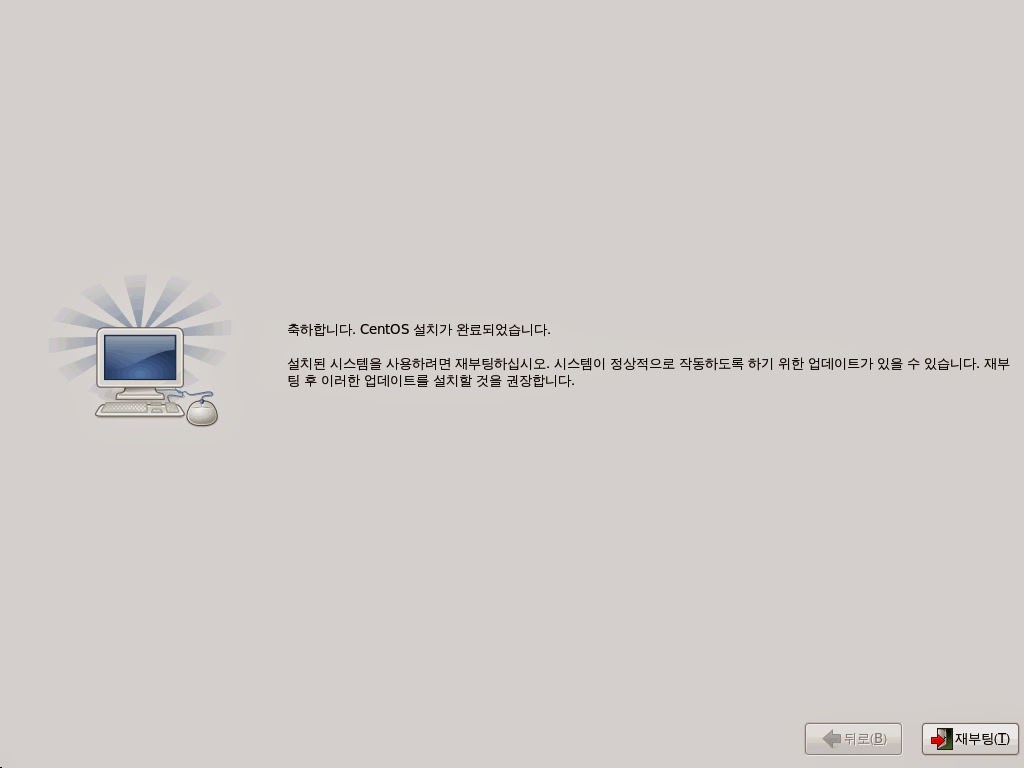
How to install CentOS 6.3 64bit on Dell R420 server
2013년 6월 24일 월요일
2013년 6월 14일 금요일
[BMT] Micron P420m 700GB (MLC) vs Fusion-io ioDrive2 365GB (MLC)
Model : Dell PE R420
CPU : Intel(R) Xeon(R) @2.00GHz Six-core)
RAM : 16GB (4GB * 4ea DDR3)
HDD : 300GB SAS * 2ea (RAID 1)
Controller : H310p mini
OS : CentOS 6.4 x64
CPU : Intel(R) Xeon(R) @2.00GHz Six-core)
RAM : 16GB (4GB * 4ea DDR3)
HDD : 300GB SAS * 2ea (RAID 1)
Controller : H310p mini
OS : CentOS 6.4 x64
2013년 6월 10일 월요일
[BMT] Micron P320h 350GB (SLC) vs Fusion-io ioDrive2 365GB (MLC)
<BMT 환경>
Model : Dell PE R420
CPU : Intel(R) Xeon(R) @2.00GHz Six-core)
RAM : 16GB (4GB * 4ea DDR3)
HDD : 300GB SAS * 2ea (RAID1)
Controller : H310p mini
OS : CentOS 6.4 x64
BMT Tool : dd, iozone, hdparm, fio
Record Size 4k ~ 10M
File Size 1GB
Model : Dell PE R420
CPU : Intel(R) Xeon(R) @2.00GHz Six-core)
RAM : 16GB (4GB * 4ea DDR3)
HDD : 300GB SAS * 2ea (RAID1)
Controller : H310p mini
OS : CentOS 6.4 x64
BMT Tool : dd, iozone, hdparm, fio
Record Size 4k ~ 10M
File Size 1GB
2013년 4월 18일 목요일
[BMT] Dell PE C5220 vs R210 II
| Model | Dell PE C5220 | |||||
| CPU | Intel(R) Xeon(R) CPU E3-1240 V2 @ 3.40GHz | |||||
| RAM | 16GB | |||||
| HDD | 300GB SAS * 2ea | |||||
| Controller | SAS 2008 | |||||
| RAID | 1 | |||||
| OS | CentOS 6.3 x64 | |||||
| iozone Ver. | 3.414 | |||||
| Record Size | 4k ~ | |||||
| File Size | 1GB | |||||
| Command line used: /opt/iozone/bin/iozone -r 4k -s 1g -i 0 -i 1 -i 2 -t 4 -F /home/test1 /home/test2 /home/test3 /home/test4 | ||||||
| KB/sec | ||||||
| Record | Write | Rewrite | Read | Re-read | Random read | Random write |
| 4k | 130,206 | 138,164 | 4,524,102 | 4,540,268 | 3,760,040 | 60,995 |
| 8k | 156,136 | 168,463 | 4,968,326 | 4,238,976 | 4,441,090 | 77,684 |
| 16k | 169,459 | 156,688 | 4,903,158 | 4,873,818 | 4,677,648 | 75,844 |
| 32k | 164,278 | 153,867 | 4,944,208 | 4,681,645 | 4,859,332 | 77,903 |
| 256k | 162,369 | 155,437 | 5,116,360 | 4,932,327 | 5,062,800 | 130,262 |
| 1024k | 157,590 | 152,813 | 4,705,793 | 4,724,258 | 4,696,701 | 146,807 |
| 2048k | 162,505 | 150,000 | 2,956,881 | 2,952,761 | 2,947,507 | 151,092 |
| 10m | 162,751 | 149,674 | 2,208,671 | 2,201,848 | 2,200,103 | 153,667 |
| Model | Dell PE R210 II | |||||
| CPU | Intel(R) Xeon(R) CPU E31240 @ 3.30GHz | |||||
| RAM | 16GB | |||||
| HDD | 300GB SAS * 2ea | |||||
| Controller | SAS 2008 | |||||
| RAID | 1 | |||||
| OS | CentOS 6.3 x64 | |||||
| iozone Ver. | 3.414 | |||||
| Record Size | 4k ~ | |||||
| File Size | 1GB | |||||
| Command line used: /opt/iozone/bin/iozone -r 4k -s 1g -i 0 -i 1 -i 2 -t 4 -F /home/test1 /home/test2 /home/test3 /home/test4 | ||||||
| KB/sec | ||||||
| Write | Rewrite | Read | Re-read | Random read | Random write | |
| 4k | 87,511 | 90,529 | 3,845,473 | 3,860,878 | 3,277,601 | 8,873 |
| 8k | 89,260 | 111,787 | 4,023,889 | 4,063,237 | 3,775,209 | 23,000 |
| 16k | 108,969 | 110,369 | 4,160,203 | 4,019,856 | 3,931,328 | 37,532 |
| 32k | 111,177 | 106,328 | 4,217,556 | 4,189,200 | 4,042,992 | 53,873 |
| 256k | 118,714 | 122,774 | 4,135,153 | 4,174,966 | 4,215,557 | 84,458 |
| 1024k | 109,537 | 105,272 | 3,167,966 | 2,992,694 | 2,993,581 | 88,286 |
| 2048k | 114,896 | 121,289 | 1,955,984 | 1,950,223 | 1,944,433 | 94,871 |
| 10m | 111,517 | 109,428 | 1,890,217 | 1,911,147 | 1,891,438 | 94,303 |
2012년 10월 8일 월요일
[Dell] compat-libstdc++-33 and zlib for OME (System Update)
<테스트 환경>
OS : CentOS 6.3 x64 / CentOS 5.8 x64
OMSA : 7.1 (최신)
#CentOS release 5.8 (Final)
Kernel \r on an \m
OMSA 설치하고 snmpd.conf 설정하고 OME에 Inventory Collect Agent 가 나타나지 않는다면 아래와 같이 설치/설정 하기 바람.
# yum install srvadmin-cm (Collect Manager?) 설치 <= i686 으로 설치됨
# /opt/dell/srvadmin/sbin/invcol 실행 후 아래와 같이 나온다면...
libstdc++.so.5 is required to run the Inventory Collector.
# yum install compat-libstdc++-33.i686 설치
아래는 OME에서 System Update 시 필요한 패키지이며 미리 설치 요망!
# yum install libstdc++.i686 libxml2.i686
(테스트)
# invcol
./invcol: error while loading shared libraries: libz.so.1: cannot open shared object file: No such file or directory
# yum install zlib.i686 zlib-devel.i686 설치
# invcol
아무런 error 표시 안된다면 O.K
# /opt/dell/srvadmin/sbin/srvadmin-services.sh restart
OS : CentOS 6.3 x64 / CentOS 5.8 x64
OMSA : 7.1 (최신)
아래 두 파일을 Redhat Linux로
인식하기 위해 아래와 같이 수정해줍니다.
**CentOS 6.x도 아래 RHEL 5.x로 입력 후 테스트 함
# vi /etc/redhat-release
Red Hat Enterprise Linux Server release 5.0 (Tikanga)
#CentOS release 5.8 (Final)
# vi /etc/issue
Red Hat Enterprise Linux Server release 5.0 (Tikanga)#CentOS release 5.8 (Final)
Kernel \r on an \m
OMSA 설치하고 snmpd.conf 설정하고 OME에 Inventory Collect Agent 가 나타나지 않는다면 아래와 같이 설치/설정 하기 바람.
# yum install srvadmin-cm (Collect Manager?) 설치 <= i686 으로 설치됨
# /opt/dell/srvadmin/sbin/invcol 실행 후 아래와 같이 나온다면...
libstdc++.so.5 is required to run the Inventory Collector.
# yum install compat-libstdc++-33.i686 설치
아래는 OME에서 System Update 시 필요한 패키지이며 미리 설치 요망!
# yum install libstdc++.i686 libxml2.i686
(테스트)
# invcol
./invcol: error while loading shared libraries: libz.so.1: cannot open shared object file: No such file or directory
# yum install zlib.i686 zlib-devel.i686 설치
# invcol
아무런 error 표시 안된다면 O.K
# /opt/dell/srvadmin/sbin/srvadmin-services.sh restart
2012년 9월 27일 목요일
Dell R620, R720 서버에 windows 2003 server 설치 방법
Dell R720xd 서버에 windows 2003 server standard x86을 설치하는데 H710p RAID Controller 의 드라이버를 Dell에서 공식적으로 지원하지 않기에(dell.com 사이트에도 없음) lsi 사이트에서 같은 칩셋 드라이버를 찾아 OS 설치 중에 F6키를 눌러 floppy 를 이용하여 설치가 가능하다.
하지만 12G 서버부터는 OS 설치 시 BIOS (F2 key) -> System BIOS -> SATA setting : AHCI 를 ATA mode로 변경 저장 후 OS를 설치해야만 한다.
OS는 설치가 잘 되었으나 부팅 중에 Blue Screen 뜨고 자동 reboot 이 되어 실패하였다.
원인을 찾고 있는데 잘 모르겠다...ㅠ.ㅠ
<참조>
http://en.community.dell.com/techcenter/extras/w/wiki/3846.how-to-install-windows-2003-on-dell-12th-generation-poweredge-servers.aspx
<Dell H710p 지원 lsi chipset driver>
http://www.lsi.com/downloads/Public/MegaRAID%20Common%20Files/5.2.127_Signed_Windows_Driver.zip
하지만 12G 서버부터는 OS 설치 시 BIOS (F2 key) -> System BIOS -> SATA setting : AHCI 를 ATA mode로 변경 저장 후 OS를 설치해야만 한다.
OS는 설치가 잘 되었으나 부팅 중에 Blue Screen 뜨고 자동 reboot 이 되어 실패하였다.
원인을 찾고 있는데 잘 모르겠다...ㅠ.ㅠ
<참조>
http://en.community.dell.com/techcenter/extras/w/wiki/3846.how-to-install-windows-2003-on-dell-12th-generation-poweredge-servers.aspx
<Dell H710p 지원 lsi chipset driver>
http://www.lsi.com/downloads/Public/MegaRAID%20Common%20Files/5.2.127_Signed_Windows_Driver.zip
2012년 4월 9일 월요일
[CentOS] MegaCli 설치 및 활용(H700 Auto Learn Cycle : Disable)
# RAID Controller device 확인
[root@localhost ~]# lspci -v |grep LSI
03:00.0 RAID bus controller: LSI Logic / Symbios Logic LSI MegaSAS 9260 (rev 05)
# MegaCli 설치(srvadmin-storelib와 충돌나기에 강제로 설치)
Download : http://www.lsi.com/products/storagecomponents/Pages/MegaRAIDSAS9260-8i.aspx
[root@localhost ~]# rpm -ivh --nodeps --force Lib_Utils-1.00-09.noarch.rpm
Preparing... ########################################### [100%]
Installing....
1:Lib_Utils ########################################### [100%]
[root@localhost ~]# rpm -ivh MegaCli-8.02.21-1.noarch.rpm
Preparing... ########################################### [100%]
1:MegaCli ########################################### [100%]
# MegaCli로 컨트롤러 세부정보 확인
[root@localhost ~]# /opt/MegaRAID/MegaCli/MegaCli64 -AdpAllInfo -aALL
Adapter #0
==============================================================================
Versions
================
Product Name : PERC H700 Integrated
Serial No : 16301CS
FW Package Build: 12.10.2-0004
Mfg. Data
================
Mfg. Date : 06/11/11
Rework Date : 06/11/11
Revision No : A04
Battery FRU : N/A
Image Versions in Flash:
================
BIOS Version : 3.18.00_4.09.05.00_0x0416A000
FW Version : 2.100.03-1405
Preboot CLI Version: 04.04-010:#008
Ctrl-R Version : 2.02-0025.1
NVDATA Version : 2.07.03-0003
Boot Block Version : 2.02.00.00-0000
BOOT Version : 01.250.04.219
Pending Images in Flash
================
None
PCI Info
================
Controller Id : 0000
Vendor Id : 1000
Device Id : 0079
SubVendorId : 1028
SubDeviceId : 1f17
Host Interface : PCIE
Number of Frontend Port: 0
Device Interface : PCIE
Number of Backend Port: 8
Port : Address
0 4433221107000000
1 4433221104000000
2 4433221105000000
3 0000000000000000
4 0000000000000000
5 0000000000000000
6 0000000000000000
7 0000000000000000
HW Configuration
================
SAS Address : 5782bcb044716f00
BBU : Present
Alarm : Absent
NVRAM : Present
Serial Debugger : Present
Memory : Present
Flash : Present
Memory Size : 512MB
TPM : Absent
On board Expander: Absent
Upgrade Key : Absent
Temperature sensor for ROC : Absent
Temperature sensor for controller : Absent
Settings
================
Current Time : 15:41:8 4/9, 2012
Predictive Fail Poll Interval : 300sec
Interrupt Throttle Active Count : 16
Interrupt Throttle Completion : 50us
Rebuild Rate : 30%
PR Rate : 30%
BGI Rate : 30%
Check Consistency Rate : 30%
Reconstruction Rate : 30%
Cache Flush Interval : 4s
Max Drives to Spinup at One Time : 4
Delay Among Spinup Groups : 12s
Physical Drive Coercion Mode : 128MB
Cluster Mode : Disabled
Alarm : Disabled
Auto Rebuild : Enabled
Battery Warning : Enabled
Ecc Bucket Size : 15
Ecc Bucket Leak Rate : 1440 Minutes
Restore HotSpare on Insertion : Disabled
Expose Enclosure Devices : Disabled
Maintain PD Fail History : Disabled
Host Request Reordering : Enabled
Auto Detect BackPlane Enabled : SGPIO/i2c SEP
Load Balance Mode : Auto
Use FDE Only : Yes
Security Key Assigned : No
Security Key Failed : No
Security Key Not Backedup : No
Default LD PowerSave Policy : Controller Defined
Maximum number of direct attached drives to spin up in 1 min : 0
Auto Enhanced Import : No
Any Offline VD Cache Preserved : No
Allow Boot with Preserved Cache : No
Disable Online Controller Reset : No
PFK in NVRAM : No
Use disk activity for locate : No
POST delay : 90 seconds
Capabilities
================
RAID Level Supported : RAID0, RAID1, RAID5, RAID6, RAID00, RAID10, RAID50, RAID60, PRL 11, PRL 11 with spanning, PRL11-RLQ0 DDF layout with no span, PRL11-RLQ0 DDF layout with span
Supported Drives : SAS, SATA
Allowed Mixing:
Mix in Enclosure Allowed
Status
================
ECC Bucket Count : 0
Limitations
================
Max Arms Per VD : 32
Max Spans Per VD : 8
Max Arrays : 128
Max Number of VDs : 64
Max Parallel Commands : 1008
Max SGE Count : 60
Max Data Transfer Size : 8192 sectors
Max Strips PerIO : 42
Max LD per array : 16
Min Strip Size : 8 KB
Max Strip Size : 1.0 MB
Max Configurable CacheCade Size: 0 GB
Current Size of CacheCade : 0 GB
Current Size of FW Cache : 394 MB
Device Present
================
Virtual Drives : 2
Degraded : 0
Offline : 0
Physical Devices : 4
Disks : 3
Critical Disks : 0
Failed Disks : 0
Supported Adapter Operations
================
Rebuild Rate : Yes
CC Rate : Yes
BGI Rate : Yes
Reconstruct Rate : Yes
Patrol Read Rate : Yes
Alarm Control : Yes
Cluster Support : No
BBU : Yes
Spanning : Yes
Dedicated Hot Spare : Yes
Revertible Hot Spares : Yes
Foreign Config Import : Yes
Self Diagnostic : Yes
Allow Mixed Redundancy on Array : No
Global Hot Spares : Yes
Deny SCSI Passthrough : No
Deny SMP Passthrough : No
Deny STP Passthrough : No
Support Security : Yes
Snapshot Enabled : No
Support the OCE without adding drives : Yes
Support PFK : No
Support PI : No
Support Boot Time PFK Change : No
Disable Online PFK Change : No
Support Shield State : No
Block SSD Write Disk Cache Change: No
Supported VD Operations
================
Read Policy : Yes
Write Policy : Yes
IO Policy : Yes
Access Policy : Yes
Disk Cache Policy : Yes
Reconstruction : Yes
Deny Locate : No
Deny CC : No
Allow Ctrl Encryption: No
Enable LDBBM : Yes
Support Breakmirror : No
Power Savings : No
Supported PD Operations
================
Force Online : Yes
Force Offline : Yes
Force Rebuild : Yes
Deny Force Failed : No
Deny Force Good/Bad : No
Deny Missing Replace : No
Deny Clear : No
Deny Locate : No
Support Temperature : No
Disable Copyback : No
Enable JBOD : No
Enable Copyback on SMART : No
Enable Copyback to SSD on SMART Error : No
Enable SSD Patrol Read : No
PR Correct Unconfigured Areas : Yes
Enable Spin Down of UnConfigured Drives : No
Disable Spin Down of hot spares : Yes
Spin Down time : 30
T10 Power State : No
Error Counters
================
Memory Correctable Errors : 0
Memory Uncorrectable Errors : 0
Cluster Information
================
Cluster Permitted : No
Cluster Active : No
Default Settings
================
Phy Polarity : 0
Phy PolaritySplit : 0
Background Rate : 30
Strip Size : 64kB
Flush Time : 4 seconds
Write Policy : WB
Read Policy : Adaptive
Cache When BBU Bad : Disabled
Cached IO : No
SMART Mode : Mode 6
Alarm Disable : Yes
Coercion Mode : 128MB
ZCR Config : Unknown
Dirty LED Shows Drive Activity : No
BIOS Continue on Error : No
Spin Down Mode : None
Allowed Device Type : SAS/SATA Mix
Allow Mix in Enclosure : Yes
Allow HDD SAS/SATA Mix in VD : No
Allow SSD SAS/SATA Mix in VD : No
Allow HDD/SSD Mix in VD : No
Allow SATA in Cluster : No
Max Chained Enclosures : 1
Disable Ctrl-R : No
Enable Web BIOS : No
Direct PD Mapping : Yes
BIOS Enumerate VDs : Yes
Restore Hot Spare on Insertion : No
Expose Enclosure Devices : No
Maintain PD Fail History : No
Disable Puncturing : No
Zero Based Enclosure Enumeration : Yes
PreBoot CLI Enabled : No
LED Show Drive Activity : Yes
Cluster Disable : Yes
SAS Disable : No
Auto Detect BackPlane Enable : SGPIO/i2c SEP
Use FDE Only : Yes
Enable Led Header : No
Delay during POST : 2
EnableCrashDump : No
Disable Online Controller Reset : No
EnableLDBBM : Yes
Un-Certified Hard Disk Drives : Allow
Treat Single span R1E as R10 : Yes
Max LD per array : 16
Power Saving option : All power saving options are disabled
Default spin down time in minutes: 30
Enable JBOD : No
TTY Log In Flash : No
Auto Enhanced Import : No
BreakMirror RAID Support : No
Disable Join Mirror : No
Enable Shield State : No
Time taken to detect CME : 60s
Exit Code: 0x00
# MegaCli로 컨트롤러 간단정보 확인
[root@localhost ~]# /opt/MegaRAID/MegaCli/MegaCli64 -ShowSummary -aALL
System
Operating System: Linux version 2.6.18-238.el5
Driver Version: 00.00.04.31-RH1
CLI Version: 8.02.21
Hardware
Controller
ProductName : PERC H700 Integrated(Bus 0, Dev 0)
SAS Address : 5782bcb044716f00
FW Package Version: 12.10.2-0004
Status : Need Attention
BBU
BBU Type : BBU
Status : Pack Missing
Enclosure
Product Id : BACKPLANE
Type : SES
Status : OK
PD
Connector : 00<Internal><Encl Pos 0 >: Slot 0
Vendor Id : ATA
Product Id : FUJITSU MHZ2250B
State : Online
Disk Type : SATA,Hard Disk Device
Capacity : 232.375 GB
Power State : Active
Connector : 00<Internal><Encl Pos 0 >: Slot 2
Vendor Id : ATA
Product Id : TOSHIBA MK2561GS
State : Online
Disk Type : SATA,Hard Disk Device
Capacity : 232.375 GB
Power State : Active
Connector : 00<Internal><Encl Pos 0 >: Slot 3
Vendor Id : ATA
Product Id : TOSHIBA MK2561GS
State : Unconfigured Good
Disk Type : SATA,Hard Disk Device
Capacity : 232.375 GB
Power State : Active
Storage
Virtual Drives
Virtual drive : Target Id 0 ,VD name Virtual Disk 0
Size : 232.375 GB
State : Optimal
RAID Level : 0
Virtual drive : Target Id 1 ,VD name Virtual Disk 1
Size : 232.375 GB
State : Optimal
RAID Level : 0
Exit Code: 0x00
# Load Balance Mode 확인
[root@localhost ~]# /opt/MegaRAID/MegaCli/MegaCli64 -AdpGetProp -LoadBalanceMode -a0
Adapter 0: Load Balance Mode: Auto
Exit Code: 0x00
# Learn Cycle Disable 설정
[root@localhost ~]# vi h700_bbu_autolearn.sh
#!/bin/sh
TMPFILE=$(mktemp -p /tmp bbu.relearn.off.XXXXXXXXXX) || exit 1
echo "autoLearnMode=1" > $TMPFILE # or =0 to enable the bbu relearn
/opt/MegaRAID/MegaCli/MegaCli64 -AdpBbuCmd -SetBbuProperties -f$TMPFILE -a0
rm -f $TMPFILE
[root@localhost ~]# ./h700_bbu_autolearn.sh
Adapter 0: Set BBU Properties Succeeded.
Exit Code: 0x00
# Learn Cycle Disable 확인
[root@localhost ~]# /opt/MegaRAID/MegaCli/MegaCli64 -AdpBbuCmd -GetBbuProperties -a0
BBU Properties for Adapter: 0
Auto Learn Period: 7776000 Sec
Next Learn time: 395069866 Sec
Learn Delay Interval:0 Hours
Auto-Learn Mode: Disabled
Exit Code: 0x00
[root@localhost ~]# /opt/MegaRAID/MegaCli/MegaCli64 -AdpBbuCmd -GetBbuProperties -a0 | grep "Auto-Learn Mode: Disabled"
Auto-Learn Mode: Disabled
>> Auto Learn Mode : Default
>> Auto Learn Mode : Disable
# cron job 설정
: off-peak time에 crontable 설정하여 learn을 강제로 start 시킴
[root@localhost ~]# omconfig storage battery action=startlearn controller=0 battery=0
Command successful!
[root@localhost ~]# lspci -v |grep LSI
03:00.0 RAID bus controller: LSI Logic / Symbios Logic LSI MegaSAS 9260 (rev 05)
# MegaCli 설치(srvadmin-storelib와 충돌나기에 강제로 설치)
Download : http://www.lsi.com/products/storagecomponents/Pages/MegaRAIDSAS9260-8i.aspx
[root@localhost ~]# rpm -ivh --nodeps --force Lib_Utils-1.00-09.noarch.rpm
Preparing... ########################################### [100%]
Installing....
1:Lib_Utils ########################################### [100%]
[root@localhost ~]# rpm -ivh MegaCli-8.02.21-1.noarch.rpm
Preparing... ########################################### [100%]
1:MegaCli ########################################### [100%]
# MegaCli로 컨트롤러 세부정보 확인
[root@localhost ~]# /opt/MegaRAID/MegaCli/MegaCli64 -AdpAllInfo -aALL
Adapter #0
==============================================================================
Versions
================
Product Name : PERC H700 Integrated
Serial No : 16301CS
FW Package Build: 12.10.2-0004
Mfg. Data
================
Mfg. Date : 06/11/11
Rework Date : 06/11/11
Revision No : A04
Battery FRU : N/A
Image Versions in Flash:
================
BIOS Version : 3.18.00_4.09.05.00_0x0416A000
FW Version : 2.100.03-1405
Preboot CLI Version: 04.04-010:#008
Ctrl-R Version : 2.02-0025.1
NVDATA Version : 2.07.03-0003
Boot Block Version : 2.02.00.00-0000
BOOT Version : 01.250.04.219
Pending Images in Flash
================
None
PCI Info
================
Controller Id : 0000
Vendor Id : 1000
Device Id : 0079
SubVendorId : 1028
SubDeviceId : 1f17
Host Interface : PCIE
Number of Frontend Port: 0
Device Interface : PCIE
Number of Backend Port: 8
Port : Address
0 4433221107000000
1 4433221104000000
2 4433221105000000
3 0000000000000000
4 0000000000000000
5 0000000000000000
6 0000000000000000
7 0000000000000000
HW Configuration
================
SAS Address : 5782bcb044716f00
BBU : Present
Alarm : Absent
NVRAM : Present
Serial Debugger : Present
Memory : Present
Flash : Present
Memory Size : 512MB
TPM : Absent
On board Expander: Absent
Upgrade Key : Absent
Temperature sensor for ROC : Absent
Temperature sensor for controller : Absent
Settings
================
Current Time : 15:41:8 4/9, 2012
Predictive Fail Poll Interval : 300sec
Interrupt Throttle Active Count : 16
Interrupt Throttle Completion : 50us
Rebuild Rate : 30%
PR Rate : 30%
BGI Rate : 30%
Check Consistency Rate : 30%
Reconstruction Rate : 30%
Cache Flush Interval : 4s
Max Drives to Spinup at One Time : 4
Delay Among Spinup Groups : 12s
Physical Drive Coercion Mode : 128MB
Cluster Mode : Disabled
Alarm : Disabled
Auto Rebuild : Enabled
Battery Warning : Enabled
Ecc Bucket Size : 15
Ecc Bucket Leak Rate : 1440 Minutes
Restore HotSpare on Insertion : Disabled
Expose Enclosure Devices : Disabled
Maintain PD Fail History : Disabled
Host Request Reordering : Enabled
Auto Detect BackPlane Enabled : SGPIO/i2c SEP
Load Balance Mode : Auto
Use FDE Only : Yes
Security Key Assigned : No
Security Key Failed : No
Security Key Not Backedup : No
Default LD PowerSave Policy : Controller Defined
Maximum number of direct attached drives to spin up in 1 min : 0
Auto Enhanced Import : No
Any Offline VD Cache Preserved : No
Allow Boot with Preserved Cache : No
Disable Online Controller Reset : No
PFK in NVRAM : No
Use disk activity for locate : No
POST delay : 90 seconds
Capabilities
================
RAID Level Supported : RAID0, RAID1, RAID5, RAID6, RAID00, RAID10, RAID50, RAID60, PRL 11, PRL 11 with spanning, PRL11-RLQ0 DDF layout with no span, PRL11-RLQ0 DDF layout with span
Supported Drives : SAS, SATA
Allowed Mixing:
Mix in Enclosure Allowed
Status
================
ECC Bucket Count : 0
Limitations
================
Max Arms Per VD : 32
Max Spans Per VD : 8
Max Arrays : 128
Max Number of VDs : 64
Max Parallel Commands : 1008
Max SGE Count : 60
Max Data Transfer Size : 8192 sectors
Max Strips PerIO : 42
Max LD per array : 16
Min Strip Size : 8 KB
Max Strip Size : 1.0 MB
Max Configurable CacheCade Size: 0 GB
Current Size of CacheCade : 0 GB
Current Size of FW Cache : 394 MB
Device Present
================
Virtual Drives : 2
Degraded : 0
Offline : 0
Physical Devices : 4
Disks : 3
Critical Disks : 0
Failed Disks : 0
Supported Adapter Operations
================
Rebuild Rate : Yes
CC Rate : Yes
BGI Rate : Yes
Reconstruct Rate : Yes
Patrol Read Rate : Yes
Alarm Control : Yes
Cluster Support : No
BBU : Yes
Spanning : Yes
Dedicated Hot Spare : Yes
Revertible Hot Spares : Yes
Foreign Config Import : Yes
Self Diagnostic : Yes
Allow Mixed Redundancy on Array : No
Global Hot Spares : Yes
Deny SCSI Passthrough : No
Deny SMP Passthrough : No
Deny STP Passthrough : No
Support Security : Yes
Snapshot Enabled : No
Support the OCE without adding drives : Yes
Support PFK : No
Support PI : No
Support Boot Time PFK Change : No
Disable Online PFK Change : No
Support Shield State : No
Block SSD Write Disk Cache Change: No
Supported VD Operations
================
Read Policy : Yes
Write Policy : Yes
IO Policy : Yes
Access Policy : Yes
Disk Cache Policy : Yes
Reconstruction : Yes
Deny Locate : No
Deny CC : No
Allow Ctrl Encryption: No
Enable LDBBM : Yes
Support Breakmirror : No
Power Savings : No
Supported PD Operations
================
Force Online : Yes
Force Offline : Yes
Force Rebuild : Yes
Deny Force Failed : No
Deny Force Good/Bad : No
Deny Missing Replace : No
Deny Clear : No
Deny Locate : No
Support Temperature : No
Disable Copyback : No
Enable JBOD : No
Enable Copyback on SMART : No
Enable Copyback to SSD on SMART Error : No
Enable SSD Patrol Read : No
PR Correct Unconfigured Areas : Yes
Enable Spin Down of UnConfigured Drives : No
Disable Spin Down of hot spares : Yes
Spin Down time : 30
T10 Power State : No
Error Counters
================
Memory Correctable Errors : 0
Memory Uncorrectable Errors : 0
Cluster Information
================
Cluster Permitted : No
Cluster Active : No
Default Settings
================
Phy Polarity : 0
Phy PolaritySplit : 0
Background Rate : 30
Strip Size : 64kB
Flush Time : 4 seconds
Write Policy : WB
Read Policy : Adaptive
Cache When BBU Bad : Disabled
Cached IO : No
SMART Mode : Mode 6
Alarm Disable : Yes
Coercion Mode : 128MB
ZCR Config : Unknown
Dirty LED Shows Drive Activity : No
BIOS Continue on Error : No
Spin Down Mode : None
Allowed Device Type : SAS/SATA Mix
Allow Mix in Enclosure : Yes
Allow HDD SAS/SATA Mix in VD : No
Allow SSD SAS/SATA Mix in VD : No
Allow HDD/SSD Mix in VD : No
Allow SATA in Cluster : No
Max Chained Enclosures : 1
Disable Ctrl-R : No
Enable Web BIOS : No
Direct PD Mapping : Yes
BIOS Enumerate VDs : Yes
Restore Hot Spare on Insertion : No
Expose Enclosure Devices : No
Maintain PD Fail History : No
Disable Puncturing : No
Zero Based Enclosure Enumeration : Yes
PreBoot CLI Enabled : No
LED Show Drive Activity : Yes
Cluster Disable : Yes
SAS Disable : No
Auto Detect BackPlane Enable : SGPIO/i2c SEP
Use FDE Only : Yes
Enable Led Header : No
Delay during POST : 2
EnableCrashDump : No
Disable Online Controller Reset : No
EnableLDBBM : Yes
Un-Certified Hard Disk Drives : Allow
Treat Single span R1E as R10 : Yes
Max LD per array : 16
Power Saving option : All power saving options are disabled
Default spin down time in minutes: 30
Enable JBOD : No
TTY Log In Flash : No
Auto Enhanced Import : No
BreakMirror RAID Support : No
Disable Join Mirror : No
Enable Shield State : No
Time taken to detect CME : 60s
Exit Code: 0x00
# MegaCli로 컨트롤러 간단정보 확인
[root@localhost ~]# /opt/MegaRAID/MegaCli/MegaCli64 -ShowSummary -aALL
System
Operating System: Linux version 2.6.18-238.el5
Driver Version: 00.00.04.31-RH1
CLI Version: 8.02.21
Hardware
Controller
ProductName : PERC H700 Integrated(Bus 0, Dev 0)
SAS Address : 5782bcb044716f00
FW Package Version: 12.10.2-0004
Status : Need Attention
BBU
BBU Type : BBU
Status : Pack Missing
Enclosure
Product Id : BACKPLANE
Type : SES
Status : OK
PD
Connector : 00<Internal><Encl Pos 0 >: Slot 0
Vendor Id : ATA
Product Id : FUJITSU MHZ2250B
State : Online
Disk Type : SATA,Hard Disk Device
Capacity : 232.375 GB
Power State : Active
Connector : 00<Internal><Encl Pos 0 >: Slot 2
Vendor Id : ATA
Product Id : TOSHIBA MK2561GS
State : Online
Disk Type : SATA,Hard Disk Device
Capacity : 232.375 GB
Power State : Active
Connector : 00<Internal><Encl Pos 0 >: Slot 3
Vendor Id : ATA
Product Id : TOSHIBA MK2561GS
State : Unconfigured Good
Disk Type : SATA,Hard Disk Device
Capacity : 232.375 GB
Power State : Active
Storage
Virtual Drives
Virtual drive : Target Id 0 ,VD name Virtual Disk 0
Size : 232.375 GB
State : Optimal
RAID Level : 0
Virtual drive : Target Id 1 ,VD name Virtual Disk 1
Size : 232.375 GB
State : Optimal
RAID Level : 0
Exit Code: 0x00
# Load Balance Mode 확인
[root@localhost ~]# /opt/MegaRAID/MegaCli/MegaCli64 -AdpGetProp -LoadBalanceMode -a0
Adapter 0: Load Balance Mode: Auto
Exit Code: 0x00
# Learn Cycle Disable 설정
[root@localhost ~]# vi h700_bbu_autolearn.sh
#!/bin/sh
TMPFILE=$(mktemp -p /tmp bbu.relearn.off.XXXXXXXXXX) || exit 1
echo "autoLearnMode=1" > $TMPFILE # or =0 to enable the bbu relearn
/opt/MegaRAID/MegaCli/MegaCli64 -AdpBbuCmd -SetBbuProperties -f$TMPFILE -a0
rm -f $TMPFILE
[root@localhost ~]# ./h700_bbu_autolearn.sh
Adapter 0: Set BBU Properties Succeeded.
Exit Code: 0x00
# Learn Cycle Disable 확인
[root@localhost ~]# /opt/MegaRAID/MegaCli/MegaCli64 -AdpBbuCmd -GetBbuProperties -a0
BBU Properties for Adapter: 0
Auto Learn Period: 7776000 Sec
Next Learn time: 395069866 Sec
Learn Delay Interval:0 Hours
Auto-Learn Mode: Disabled
Exit Code: 0x00
[root@localhost ~]# /opt/MegaRAID/MegaCli/MegaCli64 -AdpBbuCmd -GetBbuProperties -a0 | grep "Auto-Learn Mode: Disabled"
Auto-Learn Mode: Disabled
>> Auto Learn Mode : Default
>> Auto Learn Mode : Disable
# cron job 설정
: off-peak time에 crontable 설정하여 learn을 강제로 start 시킴
[root@localhost ~]# omconfig storage battery action=startlearn controller=0 battery=0
Command successful!
피드 구독하기:
글 (Atom)